> ## Documentation Index
> Fetch the complete documentation index at: https://docs-staging-chore-actions-triggers-autoupdate.mintlify.site/llms.txt
> Use this file to discover all available pages before exploring further.
# 組織メンバーを検索する
> User Search を使用して、組織のメンバーシップ、メールアドレス、接続タイプで結果を絞り込むクエリにより、Auth0 Organization のメンバーを検索します。
[Auth0 Dashboard Search](/docs/ja-jp/get-started/auth0-overview/dashboard/search-and-filter-auth0-dashboard#organization-members) 機能または [User Search](/docs/ja-jp/manage-users/user-search) を使用して、組織メンバーを検索および絞り込むことができます。
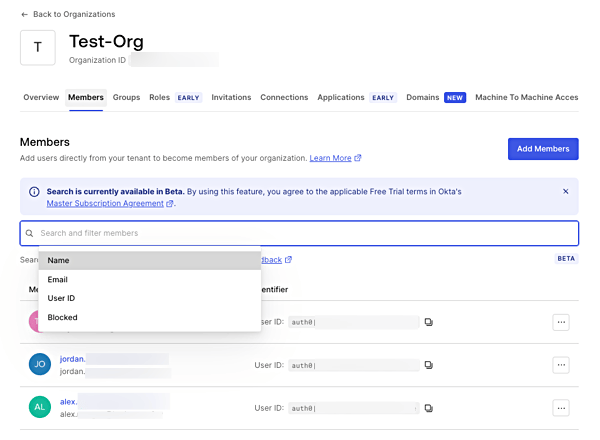
Auth0 Dashboard 検索では、Organizations セクションで[組織メンバーを絞り込み](https://manage.auth0.com/#/organizations)、名前、メールアドレス、ユーザー ID、またはブロック状態で検索できます。
 [User Search](https://manage.auth0.com/#/users) では、Users セクションの `organization_id` パラメータを使用して、organization のメンバーシップで絞り込んだユーザーを検索できます。
次のフィルターは、メールドメインが `acme.com` であり、Acme Organization のメンバーではないユーザーを検索します。
`email.domain:"acme.com" AND NOT organization_id:"ACME_ORG_ID"`
次のフィルターは、Acme Organization に所属し、特定のデータベース接続でログインするすべてのユーザーを検索します。
`organization_id:"ACME_ORG_ID" AND identities.connection:"my-db-connection-name"`
次の例は、メールアドレスが jane で始まり、Acme Organization のメンバーであるユーザーを検索します。
`organization_id:"ACME_ORG_ID" AND email:jane*`
詳細については、[User Search](/docs/ja-jp/manage-users/user-search) を参照してください。
[User Search](https://manage.auth0.com/#/users) では、Users セクションの `organization_id` パラメータを使用して、organization のメンバーシップで絞り込んだユーザーを検索できます。
次のフィルターは、メールドメインが `acme.com` であり、Acme Organization のメンバーではないユーザーを検索します。
`email.domain:"acme.com" AND NOT organization_id:"ACME_ORG_ID"`
次のフィルターは、Acme Organization に所属し、特定のデータベース接続でログインするすべてのユーザーを検索します。
`organization_id:"ACME_ORG_ID" AND identities.connection:"my-db-connection-name"`
次の例は、メールアドレスが jane で始まり、Acme Organization のメンバーであるユーザーを検索します。
`organization_id:"ACME_ORG_ID" AND email:jane*`
詳細については、[User Search](/docs/ja-jp/manage-users/user-search) を参照してください。