> ## Documentation Index
> Fetch the complete documentation index at: https://docs-staging-chore-actions-triggers-autoupdate.mintlify.site/llms.txt
> Use this file to discover all available pages before exploring further.

> 変数を使用して、フォームと Flows 内のユーザーデータにアクセスして変換する方法を学びます。

# 変数とヘルパー関数

変数を使うと、フォーム や Flows に含まれるデータにアクセスして、カスタムのビジネスロジックや自動化を実現できます。

変数を使用する際の基本的な注意点は次のとおりです。

* 変数は波かっこ `{{ variable }}` で囲みます。
* 変数が存在しない場合や解決できない場合は、`undefined` 変数と同じように扱われます。
* `null` または `undefined` の変数を扱うには、null 合体演算子を使用できます。たとえば `{{fields.foo ?? fields.bar}}` のように記述します。

<h2 id="available-variables">
  利用可能な変数
</h2>

Forms や Flows では、顧客から収集したデータを参照したり変換したりするために、さまざまな種類の変数を使用できます。

| Variable            | Syntax            | Where         | Description                  |
| ------------------- | ----------------- | ------------- | ---------------------------- |
| Context             | `{{context.*}}`   | Forms / Flows | 現在のトランザクションのコンテキストデータを参照します  |
| Form fields         | `{{fields.*}}`    | Forms / Flows | フォームフィールドや非表示フィールドのデータを参照します |
| Shared variables    | `{{vars.*}}`      | Forms / Flows | 共有変数として保存されているデータを参照します      |
| Flow actions output | `{{actions.*}}`   | Flows         | 前のフローアクションの出力レスポンスのデータを参照します |
| Helper functions    | `{{functions.*}}` | Forms / Flows | データを変換するためのヘルパー関数            |

<h3 id="context-variables">
  コンテキスト変数
</h3>

フォーム と Flows は、現在のトランザクションからコンテキスト変数を自動的に引き継ぎます。以下のコンテキスト変数を利用できます。

* `user` オブジェクト。以下のプロパティを利用できます。

  * `user.user_id`
  * `user.username`
  * `user.name`
  * `user.given_name`
  * `user.family_name`
  * `user.nickname`
  * `user.email`
  * `user.email_verified`
  * `user.phone_number`
  * `user.phone_verified`
  * `user.picture`
  * `user.user_metadata`
  * `user.app_metadata`
  * `user.created_at`
  * `user.updated_at`
  * `user.last_password_reset`
  * `user.identities`
* `organization` オブジェクト。以下のプロパティを利用できます。

  * `organization.id`
  * `organization.name`
  * `organization.display_name`
  * `organization.metadata`
* `client` オブジェクト。以下のプロパティを利用できます。

  * `client.client_id`
  * `client.name`
* `tenant` オブジェクト。以下のプロパティを利用できます。

  * `tenant.name`
* `transaction` オブジェクト。以下のプロパティを利用できます。

  * `transaction.state`
  * `transaction.correlation_id`
* `custom_domain` オブジェクト。以下のプロパティを利用できます。

  * `custom_domain.domain`
  * `custom_domain.domain_metadata`

<Accordion title="コンテキストオブジェクトの例">
  ```json lines expandable theme={null}
  {
    "user": {
      "user_id": "auth0|658409...",
      "name": "ana@travel0.com",
      "nickname": "ana",
      "email": "ana@travel0.com",
      "email_verified": true,
      "picture": "https://s.gravatar.com/avatar/8eb1b522f6...",
      "user_metadata": {},
      "app_metadata": {},
      "created_at": "2023-12-21T09:46:40.487Z",
      "updated_at": "2024-05-07T10:44:26.271Z",
      "last_password_reset": "2023-12-21T09:49:08.932Z",
      "identities": [
        {
          "user_id": "6584...",
          "isSocial": false,
          "provider": "auth0",
          "connection": "Username-Password-Authentication"
        }
      ]
    },
    "client": {
      "client_id": "xpeg5...",
      "name": "My App"
    },
    "tenant": {
      "name": "tenant-testing"
    },
    "transaction": {
      "state": "hKFo2SBId2M0...",
      "correlation_id": "txn_12345_xyz"
    },
    "custom_domain": {
      "domain": "example.com",
      "domain_metadata": {
        "key": "value"
      }
    }
  }
  ```
</Accordion>

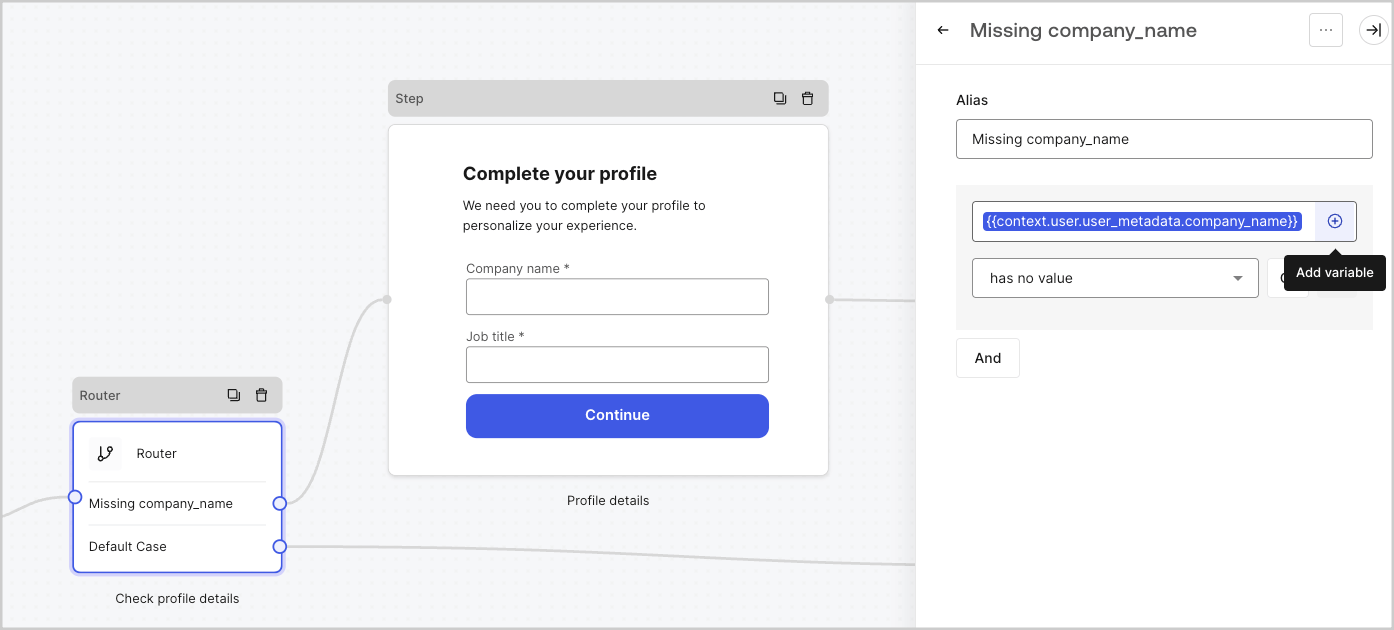
たとえば、`{{context.user.user_id}}` は `user` オブジェクトの `user_id` を参照しています。

<Frame>
  <img src="https://mintcdn.com/docs-staging-chore-actions-triggers-autoupdate/2875Xj6H216hiJJY/docs/images/cdy7uua7fh8z/3B8DRhXO2wGqeqSFb8KbQv/0a61cdbbb7f1d290950a2ddb9857aac3/Contex-variable.png?fit=max&auto=format&n=2875Xj6H216hiJJY&q=85&s=ba73a7778a8ed955fec4cbe3a558689b" alt="Dashboard > Forms > Flows" data-og-width="1141" width="1141" data-og-height="219" height="219" data-path="docs/images/cdy7uua7fh8z/3B8DRhXO2wGqeqSFb8KbQv/0a61cdbbb7f1d290950a2ddb9857aac3/Contex-variable.png" data-optimize="true" data-opv="3" srcset="https://mintcdn.com/docs-staging-chore-actions-triggers-autoupdate/2875Xj6H216hiJJY/docs/images/cdy7uua7fh8z/3B8DRhXO2wGqeqSFb8KbQv/0a61cdbbb7f1d290950a2ddb9857aac3/Contex-variable.png?w=280&fit=max&auto=format&n=2875Xj6H216hiJJY&q=85&s=1f2312ffe3d9ea20a594798341031cd2 280w, https://mintcdn.com/docs-staging-chore-actions-triggers-autoupdate/2875Xj6H216hiJJY/docs/images/cdy7uua7fh8z/3B8DRhXO2wGqeqSFb8KbQv/0a61cdbbb7f1d290950a2ddb9857aac3/Contex-variable.png?w=560&fit=max&auto=format&n=2875Xj6H216hiJJY&q=85&s=8e7b43bfcb03d8acc267b8b27e54bc7f 560w, https://mintcdn.com/docs-staging-chore-actions-triggers-autoupdate/2875Xj6H216hiJJY/docs/images/cdy7uua7fh8z/3B8DRhXO2wGqeqSFb8KbQv/0a61cdbbb7f1d290950a2ddb9857aac3/Contex-variable.png?w=840&fit=max&auto=format&n=2875Xj6H216hiJJY&q=85&s=a4562d8670e239f6de82177f40c519e7 840w, https://mintcdn.com/docs-staging-chore-actions-triggers-autoupdate/2875Xj6H216hiJJY/docs/images/cdy7uua7fh8z/3B8DRhXO2wGqeqSFb8KbQv/0a61cdbbb7f1d290950a2ddb9857aac3/Contex-variable.png?w=1100&fit=max&auto=format&n=2875Xj6H216hiJJY&q=85&s=a14f4a86b1c01883ad83839d94821661 1100w, https://mintcdn.com/docs-staging-chore-actions-triggers-autoupdate/2875Xj6H216hiJJY/docs/images/cdy7uua7fh8z/3B8DRhXO2wGqeqSFb8KbQv/0a61cdbbb7f1d290950a2ddb9857aac3/Contex-variable.png?w=1650&fit=max&auto=format&n=2875Xj6H216hiJJY&q=85&s=7b26ca2d5812f2f7d675c962e09bab98 1650w, https://mintcdn.com/docs-staging-chore-actions-triggers-autoupdate/2875Xj6H216hiJJY/docs/images/cdy7uua7fh8z/3B8DRhXO2wGqeqSFb8KbQv/0a61cdbbb7f1d290950a2ddb9857aac3/Contex-variable.png?w=2500&fit=max&auto=format&n=2875Xj6H216hiJJY&q=85&s=31819df406142e0347ad89bce2dc3429 2500w" />
</Frame>

<h3 id="form-fields-variables">
  フォームフィールド変数
</h3>

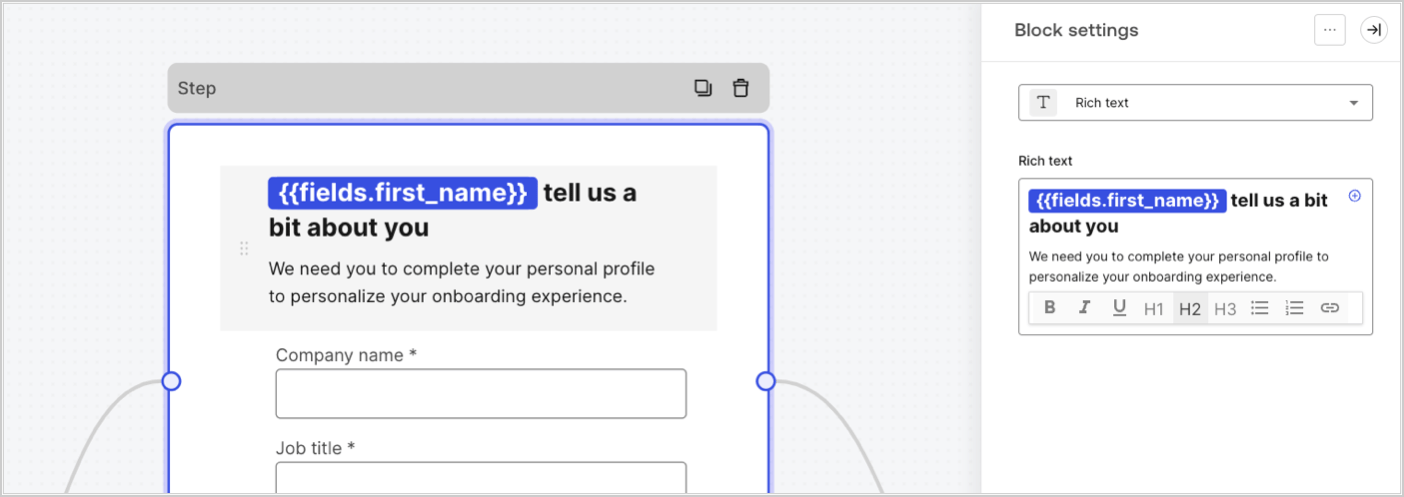
フィールド変数には、フォーム内の入力フィールドでユーザーが入力したデータと、非表示フィールドのデータが含まれます。各フィールドのデータは、フィールドの種類によって異なります。たとえば、`{{fields.first_name}}` は、ID が `first_name` のフィールドの入力値を参照します。
<Frame>
  <img src="https://mintcdn.com/docs-staging-chore-actions-triggers-autoupdate/Xn-ryY3AsEboez5D/docs/images/cdy7uua7fh8z/4D42A6ww4XvFxweoxh04Rd/016c2ed9d25bc2267ed3ed31bf8b2bf6/form-fields-variable.png?fit=max&auto=format&n=Xn-ryY3AsEboez5D&q=85&s=aee457131e36877a2d979e858d7e84b1" alt="Dashboard > Actions > Forms > フォーム" data-og-width="1404" width="1404" data-og-height="497" height="497" data-path="docs/images/cdy7uua7fh8z/4D42A6ww4XvFxweoxh04Rd/016c2ed9d25bc2267ed3ed31bf8b2bf6/form-fields-variable.png" data-optimize="true" data-opv="3" srcset="https://mintcdn.com/docs-staging-chore-actions-triggers-autoupdate/Xn-ryY3AsEboez5D/docs/images/cdy7uua7fh8z/4D42A6ww4XvFxweoxh04Rd/016c2ed9d25bc2267ed3ed31bf8b2bf6/form-fields-variable.png?w=280&fit=max&auto=format&n=Xn-ryY3AsEboez5D&q=85&s=f29c2fc353ce23ebd7ab11cf447aa26f 280w, https://mintcdn.com/docs-staging-chore-actions-triggers-autoupdate/Xn-ryY3AsEboez5D/docs/images/cdy7uua7fh8z/4D42A6ww4XvFxweoxh04Rd/016c2ed9d25bc2267ed3ed31bf8b2bf6/form-fields-variable.png?w=560&fit=max&auto=format&n=Xn-ryY3AsEboez5D&q=85&s=9b003ce5e80e54cbbb8de793bc53a244 560w, https://mintcdn.com/docs-staging-chore-actions-triggers-autoupdate/Xn-ryY3AsEboez5D/docs/images/cdy7uua7fh8z/4D42A6ww4XvFxweoxh04Rd/016c2ed9d25bc2267ed3ed31bf8b2bf6/form-fields-variable.png?w=840&fit=max&auto=format&n=Xn-ryY3AsEboez5D&q=85&s=1c416130e3f6aee0f1013cf632280781 840w, https://mintcdn.com/docs-staging-chore-actions-triggers-autoupdate/Xn-ryY3AsEboez5D/docs/images/cdy7uua7fh8z/4D42A6ww4XvFxweoxh04Rd/016c2ed9d25bc2267ed3ed31bf8b2bf6/form-fields-variable.png?w=1100&fit=max&auto=format&n=Xn-ryY3AsEboez5D&q=85&s=049b5950aec97c59e31f5354957dfb75 1100w, https://mintcdn.com/docs-staging-chore-actions-triggers-autoupdate/Xn-ryY3AsEboez5D/docs/images/cdy7uua7fh8z/4D42A6ww4XvFxweoxh04Rd/016c2ed9d25bc2267ed3ed31bf8b2bf6/form-fields-variable.png?w=1650&fit=max&auto=format&n=Xn-ryY3AsEboez5D&q=85&s=9eac483fb6eb3da7d5bb168e29011379 1650w, https://mintcdn.com/docs-staging-chore-actions-triggers-autoupdate/Xn-ryY3AsEboez5D/docs/images/cdy7uua7fh8z/4D42A6ww4XvFxweoxh04Rd/016c2ed9d25bc2267ed3ed31bf8b2bf6/form-fields-variable.png?w=2500&fit=max&auto=format&n=Xn-ryY3AsEboez5D&q=85&s=aad4f11b349e399dc9b5d3959142ac67 2500w" />
</Frame>

<h3 id="flow-output-actions-variables">
  フロー出力アクション変数
</h3>

フローアクションが実行されると、後続のアクションから参照できる出力オブジェクトのレスポンスが生成されます。たとえば、`{{actions.generate_otp.code}}` は、ID が `generate_otp` のアクションの出力コードを参照します。

<Frame>
  <img src="https://mintcdn.com/docs-staging-chore-actions-triggers-autoupdate/Ovva-2VpgZv5LVbs/docs/images/cdy7uua7fh8z/6jYtEdYqSGXm3DDv0mxQ0o/2d48012629745e07137bf6ba42f4d829/flow-output-variable.png?fit=max&auto=format&n=Ovva-2VpgZv5LVbs&q=85&s=839495d5663f54ec591fd54067037351" alt="Dashboard > Actions > Forms > Flows" data-og-width="1404" width="1404" data-og-height="253" height="253" data-path="docs/images/cdy7uua7fh8z/6jYtEdYqSGXm3DDv0mxQ0o/2d48012629745e07137bf6ba42f4d829/flow-output-variable.png" data-optimize="true" data-opv="3" srcset="https://mintcdn.com/docs-staging-chore-actions-triggers-autoupdate/Ovva-2VpgZv5LVbs/docs/images/cdy7uua7fh8z/6jYtEdYqSGXm3DDv0mxQ0o/2d48012629745e07137bf6ba42f4d829/flow-output-variable.png?w=280&fit=max&auto=format&n=Ovva-2VpgZv5LVbs&q=85&s=896be4d152a60945f0cd8781631f0a76 280w, https://mintcdn.com/docs-staging-chore-actions-triggers-autoupdate/Ovva-2VpgZv5LVbs/docs/images/cdy7uua7fh8z/6jYtEdYqSGXm3DDv0mxQ0o/2d48012629745e07137bf6ba42f4d829/flow-output-variable.png?w=560&fit=max&auto=format&n=Ovva-2VpgZv5LVbs&q=85&s=77355ae088cf4c08e37e005a18ad5851 560w, https://mintcdn.com/docs-staging-chore-actions-triggers-autoupdate/Ovva-2VpgZv5LVbs/docs/images/cdy7uua7fh8z/6jYtEdYqSGXm3DDv0mxQ0o/2d48012629745e07137bf6ba42f4d829/flow-output-variable.png?w=840&fit=max&auto=format&n=Ovva-2VpgZv5LVbs&q=85&s=92b6d4539c9ea3a5f6a91fffb42c6be3 840w, https://mintcdn.com/docs-staging-chore-actions-triggers-autoupdate/Ovva-2VpgZv5LVbs/docs/images/cdy7uua7fh8z/6jYtEdYqSGXm3DDv0mxQ0o/2d48012629745e07137bf6ba42f4d829/flow-output-variable.png?w=1100&fit=max&auto=format&n=Ovva-2VpgZv5LVbs&q=85&s=464c76bcccc7bde08daff9d2f0cce2a7 1100w, https://mintcdn.com/docs-staging-chore-actions-triggers-autoupdate/Ovva-2VpgZv5LVbs/docs/images/cdy7uua7fh8z/6jYtEdYqSGXm3DDv0mxQ0o/2d48012629745e07137bf6ba42f4d829/flow-output-variable.png?w=1650&fit=max&auto=format&n=Ovva-2VpgZv5LVbs&q=85&s=f2f5a7b539d9a8dcb89c9000c4a4699c 1650w, https://mintcdn.com/docs-staging-chore-actions-triggers-autoupdate/Ovva-2VpgZv5LVbs/docs/images/cdy7uua7fh8z/6jYtEdYqSGXm3DDv0mxQ0o/2d48012629745e07137bf6ba42f4d829/flow-output-variable.png?w=2500&fit=max&auto=format&n=Ovva-2VpgZv5LVbs&q=85&s=75b4415c10870aa8f1ddd4be3befa971 2500w" />
</Frame>

<h3 id="shared-variables">
  共有変数
</h3>

後続の Flows や、同じトランザクション内のフォームコンポーネントで共有するための変数を保存できます。共有変数は一時的なもので、特定のフォームジャーニーに関連付けられます。これらの値にアクセスできるのは、そのジャーニー内のみです。たとえば、`{{vars.external_id}}` は、ID が `external_id` の共有変数の値を参照します。

<Frame>
  <img src="https://mintcdn.com/docs-staging-chore-actions-triggers-autoupdate/Xn-ryY3AsEboez5D/docs/images/cdy7uua7fh8z/4571ExRTHL0KZKJKX9pNwj/abb631b8608a6356b0e5b3784cf8b02f/flow-shared-variable.png?fit=max&auto=format&n=Xn-ryY3AsEboez5D&q=85&s=f9ef877a0fa0282b3302b82a7c9b72b6" alt="Dashboard > Actions > Forms > Flows" data-og-width="1215" width="1215" data-og-height="162" height="162" data-path="docs/images/cdy7uua7fh8z/4571ExRTHL0KZKJKX9pNwj/abb631b8608a6356b0e5b3784cf8b02f/flow-shared-variable.png" data-optimize="true" data-opv="3" srcset="https://mintcdn.com/docs-staging-chore-actions-triggers-autoupdate/Xn-ryY3AsEboez5D/docs/images/cdy7uua7fh8z/4571ExRTHL0KZKJKX9pNwj/abb631b8608a6356b0e5b3784cf8b02f/flow-shared-variable.png?w=280&fit=max&auto=format&n=Xn-ryY3AsEboez5D&q=85&s=4c0855586101a8651d991e7a71bec1fc 280w, https://mintcdn.com/docs-staging-chore-actions-triggers-autoupdate/Xn-ryY3AsEboez5D/docs/images/cdy7uua7fh8z/4571ExRTHL0KZKJKX9pNwj/abb631b8608a6356b0e5b3784cf8b02f/flow-shared-variable.png?w=560&fit=max&auto=format&n=Xn-ryY3AsEboez5D&q=85&s=5a83c02644cfde954adf85fb900538c4 560w, https://mintcdn.com/docs-staging-chore-actions-triggers-autoupdate/Xn-ryY3AsEboez5D/docs/images/cdy7uua7fh8z/4571ExRTHL0KZKJKX9pNwj/abb631b8608a6356b0e5b3784cf8b02f/flow-shared-variable.png?w=840&fit=max&auto=format&n=Xn-ryY3AsEboez5D&q=85&s=2f4b2b91627d0cd722073c4614e49ce9 840w, https://mintcdn.com/docs-staging-chore-actions-triggers-autoupdate/Xn-ryY3AsEboez5D/docs/images/cdy7uua7fh8z/4571ExRTHL0KZKJKX9pNwj/abb631b8608a6356b0e5b3784cf8b02f/flow-shared-variable.png?w=1100&fit=max&auto=format&n=Xn-ryY3AsEboez5D&q=85&s=4424ce4849e4ea9260ebbadd150cc6e9 1100w, https://mintcdn.com/docs-staging-chore-actions-triggers-autoupdate/Xn-ryY3AsEboez5D/docs/images/cdy7uua7fh8z/4571ExRTHL0KZKJKX9pNwj/abb631b8608a6356b0e5b3784cf8b02f/flow-shared-variable.png?w=1650&fit=max&auto=format&n=Xn-ryY3AsEboez5D&q=85&s=1be47755ecbaabb7f12ffa4234f58bc4 1650w, https://mintcdn.com/docs-staging-chore-actions-triggers-autoupdate/Xn-ryY3AsEboez5D/docs/images/cdy7uua7fh8z/4571ExRTHL0KZKJKX9pNwj/abb631b8608a6356b0e5b3784cf8b02f/flow-shared-variable.png?w=2500&fit=max&auto=format&n=Xn-ryY3AsEboez5D&q=85&s=fd360c00b875e05754d4bd0d8aef8a64 2500w" />
</Frame>

<Warning>
  共有変数:

  * は内部 (サーバー側) で管理され、ブラウザー (クライアント側) には公開されません。
  * フォームコンポーネント内で共有変数を参照した場合、解決されてブラウザーに公開されることがあります。
  * 機微な情報が含まれている可能性があるため、不要または意図しない公開を避けるために、共有変数にアクセスする際は注意してください。
</Warning>

<h3 id="helper-functions">
  ヘルパー関数
</h3>

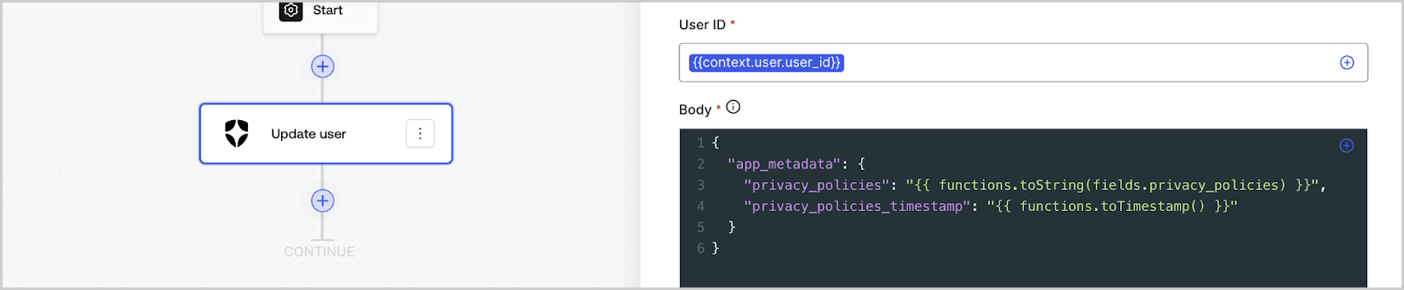
ヘルパー関数を使うと、データを変換したり、簡単な処理を行ったりできます。たとえば、`{{functions.toString(fields.privacy_policies)}}` は、ID が `privacy_policies` のフィールドの値を `toString()` 関数で変換します。
<Frame>
  <img src="https://mintcdn.com/docs-staging-chore-actions-triggers-autoupdate/OzH0n0WvmYgnSH8x/docs/images/cdy7uua7fh8z/1gyox33XJEtdkT43NppblT/0e878cc5ae2bde11b4207e105bbac6c5/flow-helper-functions.png?fit=max&auto=format&n=OzH0n0WvmYgnSH8x&q=85&s=43027c4e84790d5d16a06d5c105677d5" alt="Dashboard > Actions > Forms > Flows" data-og-width="1404" width="1404" data-og-height="290" height="290" data-path="docs/images/cdy7uua7fh8z/1gyox33XJEtdkT43NppblT/0e878cc5ae2bde11b4207e105bbac6c5/flow-helper-functions.png" data-optimize="true" data-opv="3" srcset="https://mintcdn.com/docs-staging-chore-actions-triggers-autoupdate/OzH0n0WvmYgnSH8x/docs/images/cdy7uua7fh8z/1gyox33XJEtdkT43NppblT/0e878cc5ae2bde11b4207e105bbac6c5/flow-helper-functions.png?w=280&fit=max&auto=format&n=OzH0n0WvmYgnSH8x&q=85&s=14601195fc7964d3e3fbe54a8c6d9670 280w, https://mintcdn.com/docs-staging-chore-actions-triggers-autoupdate/OzH0n0WvmYgnSH8x/docs/images/cdy7uua7fh8z/1gyox33XJEtdkT43NppblT/0e878cc5ae2bde11b4207e105bbac6c5/flow-helper-functions.png?w=560&fit=max&auto=format&n=OzH0n0WvmYgnSH8x&q=85&s=c4cf70bae0ab1d7f1d0a06af1d763ba2 560w, https://mintcdn.com/docs-staging-chore-actions-triggers-autoupdate/OzH0n0WvmYgnSH8x/docs/images/cdy7uua7fh8z/1gyox33XJEtdkT43NppblT/0e878cc5ae2bde11b4207e105bbac6c5/flow-helper-functions.png?w=840&fit=max&auto=format&n=OzH0n0WvmYgnSH8x&q=85&s=036d6041ad420409d9eefb2ce5dc3292 840w, https://mintcdn.com/docs-staging-chore-actions-triggers-autoupdate/OzH0n0WvmYgnSH8x/docs/images/cdy7uua7fh8z/1gyox33XJEtdkT43NppblT/0e878cc5ae2bde11b4207e105bbac6c5/flow-helper-functions.png?w=1100&fit=max&auto=format&n=OzH0n0WvmYgnSH8x&q=85&s=eafede234e1511ad31a48ee4fceac6e6 1100w, https://mintcdn.com/docs-staging-chore-actions-triggers-autoupdate/OzH0n0WvmYgnSH8x/docs/images/cdy7uua7fh8z/1gyox33XJEtdkT43NppblT/0e878cc5ae2bde11b4207e105bbac6c5/flow-helper-functions.png?w=1650&fit=max&auto=format&n=OzH0n0WvmYgnSH8x&q=85&s=25940dc40eb07a52eb61e939644177b2 1650w, https://mintcdn.com/docs-staging-chore-actions-triggers-autoupdate/OzH0n0WvmYgnSH8x/docs/images/cdy7uua7fh8z/1gyox33XJEtdkT43NppblT/0e878cc5ae2bde11b4207e105bbac6c5/flow-helper-functions.png?w=2500&fit=max&auto=format&n=OzH0n0WvmYgnSH8x&q=85&s=dfe8ba0ecf0ac023926cfc00e608ba97 2500w" />
</Frame>

使用できるヘルパー関数は次のとおりです。

| 関数                                       | 説明                                                                                                                                                                                                              | 例                                                                                                                |
| ---------------------------------------- | --------------------------------------------------------------------------------------------------------------------------------------------------------------------------------------------------------------- | ---------------------------------------------------------------------------------------------------------------- |
| `toArray(value)`                         | 値を配列に変換します。                                                                                                                                                                                                     | `{{ functions.toArray('abc') }} // ['abc']`                                                                      |
| `toBoolean(value)`                       | 値を真偽値に変換します。                                                                                                                                                                                                    | `{{ functions.toBoolean(1) }} // true&lt;br /&gt;&lt;br /&gt;\{\{ functions.toBoolean(0) }} // false`            |
| `length(value)`                          | 引数の値の長さを返します。                                                                                                                                                                                                   | `{{ functions.length('auth0') }} // 5`                                                                           |
| `mask(value)`                            | Executionsで値が表示されないようにマスクします。                                                                                                                                                                                   | `{{ functions.mask('my_awesome_secret') }} // ███`                                                               |
| `toNumber(value)`                        | 値を数値に変換します。                                                                                                                                                                                                     | `{{ functions.toNumber('123') }} // 123`                                                                         |
| `random(min, max, [boolean])`            | min 以上 max 以下の範囲のランダムな数値を返します。                                                                                                                                                                                  | `{{ functions.random(0, 6) }} // 4 &lt;br /&gt;&lt;br /&gt;\{\{ functions.random(0, 6, true) }} // 3.8523497...` |
| `slice(value, start, end)`               | 開始インデックスから終了インデックスまでの、値の配列または文字列の一部を返します。                                                                                                                                                                       | `{{ functions.slice( 'example', 3, 5) }} // 'mp'`                                                                |
| `toString(value)`                        | 値を文字列に変換します。                                                                                                                                                                                                    | `{{ functions.toString(123) }} // '123'`                                                                         |
| `substring(value, start, end)`           | 値の開始インデックスから終了インデックスまでの部分を返します。[slice 関数と substring 関数の違い](https://developer.mozilla.org/en-US/docs/Web/JavaScript/Reference/Global_Objects/String/substring#differences_between_substring_and_slice)についてご覧ください | `{{ functions.substring( 'example’', 3, 5) }} // 'mp'`                                                           |
| `toTimestamp()`                          | 現在の UNIX タイムスタンプを返します。                                                                                                                                                                                          | `{{ functions.toTimestamp() }} // 1628761483`                                                                    |
| `toTimestamp(date)`                      | 指定した日付をUNIX時刻で返します。                                                                                                                                                                                             | `{{ functions.toTimestamp('2021-04-30T10:02:50.876Z') }} // 1619776970`                                          |
| `toTimestamp(date)`                      | 指定した日付をUNIX時刻で返します。                                                                                                                                                                                             | `{{ functions.toTimestamp('2021-04-30T10:02:50.876Z') }} // 1619776970`                                          |
| `toLowerCase(value)`                     | 小文字に変換された新しい文字列を返します。                                                                                                                                                                                           | `{{ functions.toLowerCase('JohnDoe 1234') }} // johndoe 1234`                                                    |
| `toUpperCase(value)`                     | 大文字に変換された新しい文字列を返します。                                                                                                                                                                                           | `{{ functions.toUpperCase('JohnDoe 1234') }} // JOHNDOE 1234`                                                    |
| `replaceAll(value, string, replacement)` | パターンに一致するすべての箇所を置換文字列に置き換えた新しい文字列を返します。                                                                                                                                                                         | `{{ functions.replaceAll('2021-04-30', '-', '/') }} // 2021/04/30`                                               |
| `replace(value, string, replacement)`    | パターンに一致する箇所を置換文字列に置き換えた新しい文字列を返します。pattern が文字列の場合は、最初に出現した箇所のみが置き換えられます。                                                                                                                                       | `{{ functions.replace('2021-04-30', '-', '/') }} // 2021/04-30`                                                  |
| `split(value, separator, limit?)`        | 区切り文字で分割した部分文字列の順序付きリストを返します。                                                                                                                                                                                   | `{{ functions.split('2021-04-30', '-') }} // ['2021', '04', '30']`                                               |
| `now()`                                  | 現在の日時を ISO 8601 形式で返します。                                                                                                                                                                                        | `{{ functions.now() }} // 2021-04-30T10:31:28.576Z`                                                              |
| `includes(collection, item, fromIndex?)` | 配列に特定の値が含まれているかどうかを返します。                                                                                                                                                                                        | `{{ functions.includes(['auth0', 'identity', 'authentication'], 'identity') }} // true`                          |
| `indexOf(collection, item, fromIndex?)`  | 配列内で指定した要素が最初に見つかるインデックスを返し、存在しない場合は -1 を返します。                                                                                                                                                                  | `{{ functions.indexOf(['auth0', 'identity', 'authentication'], 'identity') }} // 1`                              |
| `merge(base, value)`                     | ベースのデータ型に応じて、配列やオブジェクトをマージするか、文字列を連結した結果を返します。                                                                                                                                                                  | `{{ functions.merge(['auth0', 'identity'], ['authentication']) }} // ['auth0', 'identity', 'authentication']`    |
| `md5(value)`                             | MD5 ハッシュ値を返します。                                                                                                                                                                                                 | `{{ functions.md5('auth0') }} // 7bbb597...`                                                                     |
| `sha1(value)`                            | SHA1ハッシュ値を返します。                                                                                                                                                                                                 | `{{ functions.sha1('auth0') }} // b4ec5339...`                                                                   |
| `sha256(value)`                          | SHA256ハッシュ値を返します。                                                                                                                                                                                               | `{{ functions.sha256('auth0') }} // d9082bdc...`                                                                 |
| `sha512(value)`                          | SHA512ハッシュ値を返します。                                                                                                                                                                                               | `{{ functions.sha512('auth0') }} // c0d588069d...`                                                               |
| `uuid()`                                 | ランダムな v4 UUID を返します。                                                                                                                                                                                            | `{{ functions.uuid() }} // 36b8f84d-df4e-4d49-b662-bcde71a8764`                                                  |

<h2 id="variables-best-practices">
  変数のベストプラクティス
</h2>

<h3 id="use-meaningful-ids">
  意味のあるIDを使用する
</h3>

FormフィールドやFlowアクションを追加すると、IDは自動的に生成されます。

IDは、どの情報が入っているか分かるように、より具体的で分かりやすい値に更新してください。たとえば、ユーザーの名を保存するFormフィールドを作成する場合は、IDを`first_name`に変更します。

<h3 id="be-mindful-when-updating-existing-ids">
  既存のIDを更新する際は注意してください
</h3>

変数がすでに使用されていてIDを変更する必要がある場合は、そのIDをどこで参照しているかを確認し、`undefined` や空の値が発生しないよう、該当箇所のIDもあわせて更新してください。

<h3 id="check-flow-executions">
  Flow の実行を確認する
</h3>

想定外の変数の値が表示された場合は、[**Executions**](/docs/ja-jp/customize/forms/flows/flow-execution-and-debugger) ビューを使って変数の問題を調査してください。

<h3 id="use-the-autocomplete-menu">
  オートコンプリートメニューを使用する
</h3>

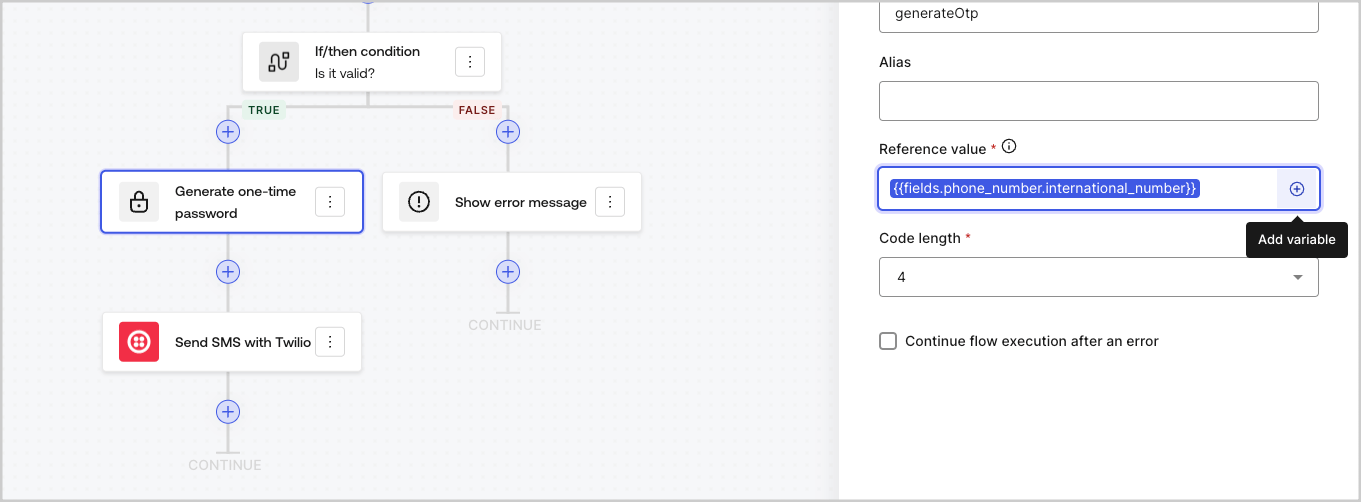
オートコンプリートメニューを使うと、既存の変数を見つけて正しく参照できます。
<Frame>
  <img src="https://mintcdn.com/docs-staging-chore-actions-triggers-autoupdate/2875Xj6H216hiJJY/docs/images/cdy7uua7fh8z/3SKnDuaMzSImxZtDDAoZaz/9ea800fad29ef71d1ded3c72b87660a4/Autocomplete-flows.png?fit=max&auto=format&n=2875Xj6H216hiJJY&q=85&s=91447b59ef227998f1022388a8fca85a" alt="Dashboard > Actions > Forms > Flows" data-og-width="1361" width="1361" data-og-height="502" height="502" data-path="docs/images/cdy7uua7fh8z/3SKnDuaMzSImxZtDDAoZaz/9ea800fad29ef71d1ded3c72b87660a4/Autocomplete-flows.png" data-optimize="true" data-opv="3" srcset="https://mintcdn.com/docs-staging-chore-actions-triggers-autoupdate/2875Xj6H216hiJJY/docs/images/cdy7uua7fh8z/3SKnDuaMzSImxZtDDAoZaz/9ea800fad29ef71d1ded3c72b87660a4/Autocomplete-flows.png?w=280&fit=max&auto=format&n=2875Xj6H216hiJJY&q=85&s=1e2d1bfaff9e409f07ab6a7896627415 280w, https://mintcdn.com/docs-staging-chore-actions-triggers-autoupdate/2875Xj6H216hiJJY/docs/images/cdy7uua7fh8z/3SKnDuaMzSImxZtDDAoZaz/9ea800fad29ef71d1ded3c72b87660a4/Autocomplete-flows.png?w=560&fit=max&auto=format&n=2875Xj6H216hiJJY&q=85&s=dda50037477a2f0c6040bcbba38464a8 560w, https://mintcdn.com/docs-staging-chore-actions-triggers-autoupdate/2875Xj6H216hiJJY/docs/images/cdy7uua7fh8z/3SKnDuaMzSImxZtDDAoZaz/9ea800fad29ef71d1ded3c72b87660a4/Autocomplete-flows.png?w=840&fit=max&auto=format&n=2875Xj6H216hiJJY&q=85&s=2d45a15f1d8298aa811e872ada69809a 840w, https://mintcdn.com/docs-staging-chore-actions-triggers-autoupdate/2875Xj6H216hiJJY/docs/images/cdy7uua7fh8z/3SKnDuaMzSImxZtDDAoZaz/9ea800fad29ef71d1ded3c72b87660a4/Autocomplete-flows.png?w=1100&fit=max&auto=format&n=2875Xj6H216hiJJY&q=85&s=943666c83b760ed28316e836ac04f9c1 1100w, https://mintcdn.com/docs-staging-chore-actions-triggers-autoupdate/2875Xj6H216hiJJY/docs/images/cdy7uua7fh8z/3SKnDuaMzSImxZtDDAoZaz/9ea800fad29ef71d1ded3c72b87660a4/Autocomplete-flows.png?w=1650&fit=max&auto=format&n=2875Xj6H216hiJJY&q=85&s=f744f8f0051f5bb3df860e4c0006ac32 1650w, https://mintcdn.com/docs-staging-chore-actions-triggers-autoupdate/2875Xj6H216hiJJY/docs/images/cdy7uua7fh8z/3SKnDuaMzSImxZtDDAoZaz/9ea800fad29ef71d1ded3c72b87660a4/Autocomplete-flows.png?w=2500&fit=max&auto=format&n=2875Xj6H216hiJJY&q=85&s=f6fb56e6c5e2735a5968488fa427a8f7 2500w" />
</Frame>

<Frame>
  <img src="https://mintcdn.com/docs-staging-chore-actions-triggers-autoupdate/2875Xj6H216hiJJY/docs/images/cdy7uua7fh8z/2kjRKozVgrd2a7UJXOANaN/ee5452d7210cd2f13b0e97763f11c82a/Autocomplete-forms.png?fit=max&auto=format&n=2875Xj6H216hiJJY&q=85&s=a84331a5cbb42b1911611ce579d5942b" alt="Dashboard > Actions > Forms > Form" data-og-width="1394" width="1394" data-og-height="630" height="630" data-path="docs/images/cdy7uua7fh8z/2kjRKozVgrd2a7UJXOANaN/ee5452d7210cd2f13b0e97763f11c82a/Autocomplete-forms.png" data-optimize="true" data-opv="3" srcset="https://mintcdn.com/docs-staging-chore-actions-triggers-autoupdate/2875Xj6H216hiJJY/docs/images/cdy7uua7fh8z/2kjRKozVgrd2a7UJXOANaN/ee5452d7210cd2f13b0e97763f11c82a/Autocomplete-forms.png?w=280&fit=max&auto=format&n=2875Xj6H216hiJJY&q=85&s=6cef2f5c768e8dd2dd6e980ed7e41b5d 280w, https://mintcdn.com/docs-staging-chore-actions-triggers-autoupdate/2875Xj6H216hiJJY/docs/images/cdy7uua7fh8z/2kjRKozVgrd2a7UJXOANaN/ee5452d7210cd2f13b0e97763f11c82a/Autocomplete-forms.png?w=560&fit=max&auto=format&n=2875Xj6H216hiJJY&q=85&s=82a98ca98196b318319de2f840a3d40e 560w, https://mintcdn.com/docs-staging-chore-actions-triggers-autoupdate/2875Xj6H216hiJJY/docs/images/cdy7uua7fh8z/2kjRKozVgrd2a7UJXOANaN/ee5452d7210cd2f13b0e97763f11c82a/Autocomplete-forms.png?w=840&fit=max&auto=format&n=2875Xj6H216hiJJY&q=85&s=94f77c9f128e3520e2225b1d99b29bee 840w, https://mintcdn.com/docs-staging-chore-actions-triggers-autoupdate/2875Xj6H216hiJJY/docs/images/cdy7uua7fh8z/2kjRKozVgrd2a7UJXOANaN/ee5452d7210cd2f13b0e97763f11c82a/Autocomplete-forms.png?w=1100&fit=max&auto=format&n=2875Xj6H216hiJJY&q=85&s=649ff4e3f7fe765cb3d153d1a17fbd0f 1100w, https://mintcdn.com/docs-staging-chore-actions-triggers-autoupdate/2875Xj6H216hiJJY/docs/images/cdy7uua7fh8z/2kjRKozVgrd2a7UJXOANaN/ee5452d7210cd2f13b0e97763f11c82a/Autocomplete-forms.png?w=1650&fit=max&auto=format&n=2875Xj6H216hiJJY&q=85&s=eac95dd8640ea2146c994321dff0ed72 1650w, https://mintcdn.com/docs-staging-chore-actions-triggers-autoupdate/2875Xj6H216hiJJY/docs/images/cdy7uua7fh8z/2kjRKozVgrd2a7UJXOANaN/ee5452d7210cd2f13b0e97763f11c82a/Autocomplete-forms.png?w=2500&fit=max&auto=format&n=2875Xj6H216hiJJY&q=85&s=a5b3d486168b35835fc13e06c46bf317 2500w" />
</Frame>