> ## Documentation Index
> Fetch the complete documentation index at: https://docs-staging-chore-actions-triggers-autoupdate.mintlify.site/llms.txt
> Use this file to discover all available pages before exploring further.

> Découvrez comment utiliser les variables pour accéder aux données utilisateur et les transformer dans Forms et Flows.

# Variables et fonctions utilitaires

Les variables vous permettent d’accéder aux données contenues dans Forms et Flows pour créer une logique métier personnalisée et des automatisations.

Voici quelques points de base à retenir sur l’utilisation des variables :

* Les variables sont entourées d’accolades `{{ variable }}`.
* Si une variable n’existe pas ou ne peut pas être résolue, elle a le même effet qu’une variable `undefined`.
* Vous pouvez utiliser l’opérateur de coalescence des valeurs nulles pour gérer les variables `null` ou `undefined`, par exemple :`{{fields.foo ?? fields.bar}}`.

<h2 id="available-variables">
  Variables disponibles
</h2>

Vous pouvez utiliser différents types de variables pour référencer et transformer les données que vous recueillez auprès de vos clients avec Forms et Flows.

| Variable                   | Syntaxe           | Où            | Description                                                                   |
| -------------------------- | ----------------- | ------------- | ----------------------------------------------------------------------------- |
| Contexte                   | `{{context.*}}`   | Forms / Flows | Référence les données de contexte de la transaction en cours                  |
| Champs de formulaire       | `{{fields.*}}`    | Forms / Flows | Référence les données de vos champs de formulaire et de vos champs masqués    |
| Variables partagées        | `{{vars.*}}`      | Forms / Flows | Référence les données stockées dans des variables partagées                   |
| Sortie des actions de Flow | `{{actions.*}}`   | Flows         | Référence les données de la réponse de sortie des actions de Flow précédentes |
| Fonctions utilitaires      | `{{functions.*}}` | Forms / Flows | Fonctions utilitaires pour transformer les données                            |

<h3 id="context-variables">
  Variables de contexte
</h3>

Forms et les flows héritent automatiquement des variables de contexte de la transaction en cours. Vous pouvez accéder aux variables de contexte suivantes :

* L’objet `user`, avec accès aux propriétés suivantes :

  * `user.user_id`
  * `user.username`
  * `user.name`
  * `user.given_name`
  * `user.family_name`
  * `user.nickname`
  * `user.email`
  * `user.email_verified`
  * `user.phone_number`
  * `user.phone_verified`
  * `user.picture`
  * `user.user_metadata`
  * `user.app_metadata`
  * `user.created_at`
  * `user.updated_at`
  * `user.last_password_reset`
  * `user.identities`
* L’objet `organization`, avec accès aux propriétés suivantes :

  * `organization.id`
  * `organization.name`
  * `organization.display_name`
  * `organization.metadata`
* L’objet `client`, avec accès aux propriétés suivantes :

  * `client.client_id`
  * `client.name`
* L’objet `tenant`, avec accès à la propriété suivante :

  * `tenant.name`
* L’objet `transaction`, avec accès aux propriétés suivantes :

  * `transaction.state`
  * `transaction.correlation_id`
* L’objet `custom_domain`, avec accès aux propriétés suivantes :

  * `custom_domain.domain`
  * `custom_domain.domain_metadata`

<Accordion title="Exemple d’objet de contexte">
  ```json lines expandable theme={null}
  {
    "user": {
      "user_id": "auth0|658409...",
      "name": "ana@travel0.com",
      "nickname": "ana",
      "email": "ana@travel0.com",
      "email_verified": true,
      "picture": "https://s.gravatar.com/avatar/8eb1b522f6...",
      "user_metadata": {},
      "app_metadata": {},
      "created_at": "2023-12-21T09:46:40.487Z",
      "updated_at": "2024-05-07T10:44:26.271Z",
      "last_password_reset": "2023-12-21T09:49:08.932Z",
      "identities": [
        {
          "user_id": "6584...",
          "isSocial": false,
          "provider": "auth0",
          "connection": "Username-Password-Authentication"
        }
      ]
    },
    "client": {
      "client_id": "xpeg5...",
      "name": "My App"
    },
    "tenant": {
      "name": "tenant-testing"
    },
    "transaction": {
      "state": "hKFo2SBId2M0...",
      "correlation_id": "txn_12345_xyz"
    },
    "custom_domain": {
      "domain": "example.com",
      "domain_metadata": {
        "key": "value"
      }
    }
  }
  ```
</Accordion>

Par exemple :  `{{context.user.user_id}}` correspond au `user_id` de l’objet `user`.

<Frame>
  <img src="https://mintcdn.com/docs-staging-chore-actions-triggers-autoupdate/2875Xj6H216hiJJY/docs/images/cdy7uua7fh8z/3B8DRhXO2wGqeqSFb8KbQv/0a61cdbbb7f1d290950a2ddb9857aac3/Contex-variable.png?fit=max&auto=format&n=2875Xj6H216hiJJY&q=85&s=ba73a7778a8ed955fec4cbe3a558689b" alt="Dashboard > Forms > Flows" data-og-width="1141" width="1141" data-og-height="219" height="219" data-path="docs/images/cdy7uua7fh8z/3B8DRhXO2wGqeqSFb8KbQv/0a61cdbbb7f1d290950a2ddb9857aac3/Contex-variable.png" data-optimize="true" data-opv="3" srcset="https://mintcdn.com/docs-staging-chore-actions-triggers-autoupdate/2875Xj6H216hiJJY/docs/images/cdy7uua7fh8z/3B8DRhXO2wGqeqSFb8KbQv/0a61cdbbb7f1d290950a2ddb9857aac3/Contex-variable.png?w=280&fit=max&auto=format&n=2875Xj6H216hiJJY&q=85&s=1f2312ffe3d9ea20a594798341031cd2 280w, https://mintcdn.com/docs-staging-chore-actions-triggers-autoupdate/2875Xj6H216hiJJY/docs/images/cdy7uua7fh8z/3B8DRhXO2wGqeqSFb8KbQv/0a61cdbbb7f1d290950a2ddb9857aac3/Contex-variable.png?w=560&fit=max&auto=format&n=2875Xj6H216hiJJY&q=85&s=8e7b43bfcb03d8acc267b8b27e54bc7f 560w, https://mintcdn.com/docs-staging-chore-actions-triggers-autoupdate/2875Xj6H216hiJJY/docs/images/cdy7uua7fh8z/3B8DRhXO2wGqeqSFb8KbQv/0a61cdbbb7f1d290950a2ddb9857aac3/Contex-variable.png?w=840&fit=max&auto=format&n=2875Xj6H216hiJJY&q=85&s=a4562d8670e239f6de82177f40c519e7 840w, https://mintcdn.com/docs-staging-chore-actions-triggers-autoupdate/2875Xj6H216hiJJY/docs/images/cdy7uua7fh8z/3B8DRhXO2wGqeqSFb8KbQv/0a61cdbbb7f1d290950a2ddb9857aac3/Contex-variable.png?w=1100&fit=max&auto=format&n=2875Xj6H216hiJJY&q=85&s=a14f4a86b1c01883ad83839d94821661 1100w, https://mintcdn.com/docs-staging-chore-actions-triggers-autoupdate/2875Xj6H216hiJJY/docs/images/cdy7uua7fh8z/3B8DRhXO2wGqeqSFb8KbQv/0a61cdbbb7f1d290950a2ddb9857aac3/Contex-variable.png?w=1650&fit=max&auto=format&n=2875Xj6H216hiJJY&q=85&s=7b26ca2d5812f2f7d675c962e09bab98 1650w, https://mintcdn.com/docs-staging-chore-actions-triggers-autoupdate/2875Xj6H216hiJJY/docs/images/cdy7uua7fh8z/3B8DRhXO2wGqeqSFb8KbQv/0a61cdbbb7f1d290950a2ddb9857aac3/Contex-variable.png?w=2500&fit=max&auto=format&n=2875Xj6H216hiJJY&q=85&s=31819df406142e0347ad89bce2dc3429 2500w" />
</Frame>

<h3 id="form-fields-variables">
  Variables des champs du formulaire
</h3>

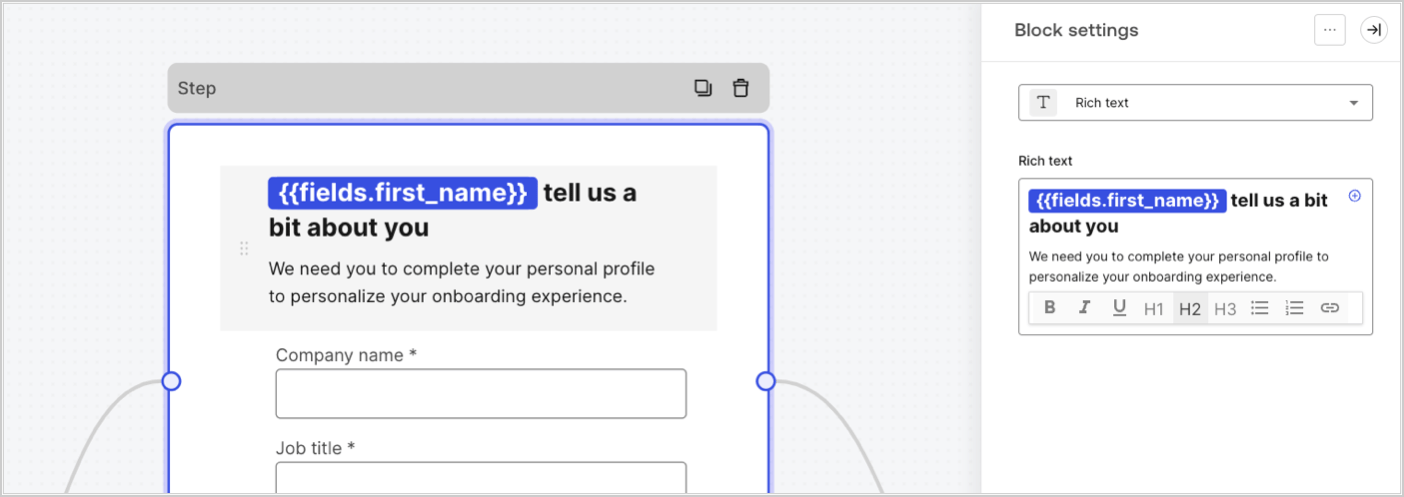
Les variables de champ contiennent les données saisies par l’utilisateur dans les champs de saisie du formulaire, ainsi que les données des champs masqués. Les données associées à chaque champ varient selon le type de champ. Par exemple : `{{fields.first_name}}` fait référence à la valeur saisie dans un champ ayant l’ID `first_name`.
<Frame>
  <img src="https://mintcdn.com/docs-staging-chore-actions-triggers-autoupdate/Xn-ryY3AsEboez5D/docs/images/cdy7uua7fh8z/4D42A6ww4XvFxweoxh04Rd/016c2ed9d25bc2267ed3ed31bf8b2bf6/form-fields-variable.png?fit=max&auto=format&n=Xn-ryY3AsEboez5D&q=85&s=aee457131e36877a2d979e858d7e84b1" alt="Dashboard > Actions > Forms > Form" data-og-width="1404" width="1404" data-og-height="497" height="497" data-path="docs/images/cdy7uua7fh8z/4D42A6ww4XvFxweoxh04Rd/016c2ed9d25bc2267ed3ed31bf8b2bf6/form-fields-variable.png" data-optimize="true" data-opv="3" srcset="https://mintcdn.com/docs-staging-chore-actions-triggers-autoupdate/Xn-ryY3AsEboez5D/docs/images/cdy7uua7fh8z/4D42A6ww4XvFxweoxh04Rd/016c2ed9d25bc2267ed3ed31bf8b2bf6/form-fields-variable.png?w=280&fit=max&auto=format&n=Xn-ryY3AsEboez5D&q=85&s=f29c2fc353ce23ebd7ab11cf447aa26f 280w, https://mintcdn.com/docs-staging-chore-actions-triggers-autoupdate/Xn-ryY3AsEboez5D/docs/images/cdy7uua7fh8z/4D42A6ww4XvFxweoxh04Rd/016c2ed9d25bc2267ed3ed31bf8b2bf6/form-fields-variable.png?w=560&fit=max&auto=format&n=Xn-ryY3AsEboez5D&q=85&s=9b003ce5e80e54cbbb8de793bc53a244 560w, https://mintcdn.com/docs-staging-chore-actions-triggers-autoupdate/Xn-ryY3AsEboez5D/docs/images/cdy7uua7fh8z/4D42A6ww4XvFxweoxh04Rd/016c2ed9d25bc2267ed3ed31bf8b2bf6/form-fields-variable.png?w=840&fit=max&auto=format&n=Xn-ryY3AsEboez5D&q=85&s=1c416130e3f6aee0f1013cf632280781 840w, https://mintcdn.com/docs-staging-chore-actions-triggers-autoupdate/Xn-ryY3AsEboez5D/docs/images/cdy7uua7fh8z/4D42A6ww4XvFxweoxh04Rd/016c2ed9d25bc2267ed3ed31bf8b2bf6/form-fields-variable.png?w=1100&fit=max&auto=format&n=Xn-ryY3AsEboez5D&q=85&s=049b5950aec97c59e31f5354957dfb75 1100w, https://mintcdn.com/docs-staging-chore-actions-triggers-autoupdate/Xn-ryY3AsEboez5D/docs/images/cdy7uua7fh8z/4D42A6ww4XvFxweoxh04Rd/016c2ed9d25bc2267ed3ed31bf8b2bf6/form-fields-variable.png?w=1650&fit=max&auto=format&n=Xn-ryY3AsEboez5D&q=85&s=9eac483fb6eb3da7d5bb168e29011379 1650w, https://mintcdn.com/docs-staging-chore-actions-triggers-autoupdate/Xn-ryY3AsEboez5D/docs/images/cdy7uua7fh8z/4D42A6ww4XvFxweoxh04Rd/016c2ed9d25bc2267ed3ed31bf8b2bf6/form-fields-variable.png?w=2500&fit=max&auto=format&n=Xn-ryY3AsEboez5D&q=85&s=aad4f11b349e399dc9b5d3959142ac67 2500w" />
</Frame>

<h3 id="flow-output-actions-variables">
  Variables de sortie des actions de Flow
</h3>

Lorsqu’une action de Flow est exécutée, elle génère une réponse sous forme d’objet de sortie qui peut être utilisée dans les actions suivantes. Par exemple : `{{actions.generate_otp.code}}` fait référence au code de sortie de l’action ayant l’ID `generate_otp`.

<Frame>
  <img src="https://mintcdn.com/docs-staging-chore-actions-triggers-autoupdate/Ovva-2VpgZv5LVbs/docs/images/cdy7uua7fh8z/6jYtEdYqSGXm3DDv0mxQ0o/2d48012629745e07137bf6ba42f4d829/flow-output-variable.png?fit=max&auto=format&n=Ovva-2VpgZv5LVbs&q=85&s=839495d5663f54ec591fd54067037351" alt="Dashboard > Actions > Forms > Flows" data-og-width="1404" width="1404" data-og-height="253" height="253" data-path="docs/images/cdy7uua7fh8z/6jYtEdYqSGXm3DDv0mxQ0o/2d48012629745e07137bf6ba42f4d829/flow-output-variable.png" data-optimize="true" data-opv="3" srcset="https://mintcdn.com/docs-staging-chore-actions-triggers-autoupdate/Ovva-2VpgZv5LVbs/docs/images/cdy7uua7fh8z/6jYtEdYqSGXm3DDv0mxQ0o/2d48012629745e07137bf6ba42f4d829/flow-output-variable.png?w=280&fit=max&auto=format&n=Ovva-2VpgZv5LVbs&q=85&s=896be4d152a60945f0cd8781631f0a76 280w, https://mintcdn.com/docs-staging-chore-actions-triggers-autoupdate/Ovva-2VpgZv5LVbs/docs/images/cdy7uua7fh8z/6jYtEdYqSGXm3DDv0mxQ0o/2d48012629745e07137bf6ba42f4d829/flow-output-variable.png?w=560&fit=max&auto=format&n=Ovva-2VpgZv5LVbs&q=85&s=77355ae088cf4c08e37e005a18ad5851 560w, https://mintcdn.com/docs-staging-chore-actions-triggers-autoupdate/Ovva-2VpgZv5LVbs/docs/images/cdy7uua7fh8z/6jYtEdYqSGXm3DDv0mxQ0o/2d48012629745e07137bf6ba42f4d829/flow-output-variable.png?w=840&fit=max&auto=format&n=Ovva-2VpgZv5LVbs&q=85&s=92b6d4539c9ea3a5f6a91fffb42c6be3 840w, https://mintcdn.com/docs-staging-chore-actions-triggers-autoupdate/Ovva-2VpgZv5LVbs/docs/images/cdy7uua7fh8z/6jYtEdYqSGXm3DDv0mxQ0o/2d48012629745e07137bf6ba42f4d829/flow-output-variable.png?w=1100&fit=max&auto=format&n=Ovva-2VpgZv5LVbs&q=85&s=464c76bcccc7bde08daff9d2f0cce2a7 1100w, https://mintcdn.com/docs-staging-chore-actions-triggers-autoupdate/Ovva-2VpgZv5LVbs/docs/images/cdy7uua7fh8z/6jYtEdYqSGXm3DDv0mxQ0o/2d48012629745e07137bf6ba42f4d829/flow-output-variable.png?w=1650&fit=max&auto=format&n=Ovva-2VpgZv5LVbs&q=85&s=f2f5a7b539d9a8dcb89c9000c4a4699c 1650w, https://mintcdn.com/docs-staging-chore-actions-triggers-autoupdate/Ovva-2VpgZv5LVbs/docs/images/cdy7uua7fh8z/6jYtEdYqSGXm3DDv0mxQ0o/2d48012629745e07137bf6ba42f4d829/flow-output-variable.png?w=2500&fit=max&auto=format&n=Ovva-2VpgZv5LVbs&q=85&s=75b4415c10870aa8f1ddd4be3befa971 2500w" />
</Frame>

<h3 id="shared-variables">
  Variables partagées
</h3>

Vous pouvez stocker des variables afin qu’elles soient partagées avec des flows ultérieurs ou même avec des composants de formulaire dans la même transaction. Les variables partagées sont éphémères et associées à un parcours de formulaire précis. Leurs valeurs ne sont pas accessibles à l’extérieur de ce parcours. Par exemple : `{{vars.external_id}}` fait référence à la valeur d’une variable partagée ayant l’ID `external_id`.

<Frame>
  <img src="https://mintcdn.com/docs-staging-chore-actions-triggers-autoupdate/Xn-ryY3AsEboez5D/docs/images/cdy7uua7fh8z/4571ExRTHL0KZKJKX9pNwj/abb631b8608a6356b0e5b3784cf8b02f/flow-shared-variable.png?fit=max&auto=format&n=Xn-ryY3AsEboez5D&q=85&s=f9ef877a0fa0282b3302b82a7c9b72b6" alt="Dashboard > Actions > Forms > Flows" data-og-width="1215" width="1215" data-og-height="162" height="162" data-path="docs/images/cdy7uua7fh8z/4571ExRTHL0KZKJKX9pNwj/abb631b8608a6356b0e5b3784cf8b02f/flow-shared-variable.png" data-optimize="true" data-opv="3" srcset="https://mintcdn.com/docs-staging-chore-actions-triggers-autoupdate/Xn-ryY3AsEboez5D/docs/images/cdy7uua7fh8z/4571ExRTHL0KZKJKX9pNwj/abb631b8608a6356b0e5b3784cf8b02f/flow-shared-variable.png?w=280&fit=max&auto=format&n=Xn-ryY3AsEboez5D&q=85&s=4c0855586101a8651d991e7a71bec1fc 280w, https://mintcdn.com/docs-staging-chore-actions-triggers-autoupdate/Xn-ryY3AsEboez5D/docs/images/cdy7uua7fh8z/4571ExRTHL0KZKJKX9pNwj/abb631b8608a6356b0e5b3784cf8b02f/flow-shared-variable.png?w=560&fit=max&auto=format&n=Xn-ryY3AsEboez5D&q=85&s=5a83c02644cfde954adf85fb900538c4 560w, https://mintcdn.com/docs-staging-chore-actions-triggers-autoupdate/Xn-ryY3AsEboez5D/docs/images/cdy7uua7fh8z/4571ExRTHL0KZKJKX9pNwj/abb631b8608a6356b0e5b3784cf8b02f/flow-shared-variable.png?w=840&fit=max&auto=format&n=Xn-ryY3AsEboez5D&q=85&s=2f4b2b91627d0cd722073c4614e49ce9 840w, https://mintcdn.com/docs-staging-chore-actions-triggers-autoupdate/Xn-ryY3AsEboez5D/docs/images/cdy7uua7fh8z/4571ExRTHL0KZKJKX9pNwj/abb631b8608a6356b0e5b3784cf8b02f/flow-shared-variable.png?w=1100&fit=max&auto=format&n=Xn-ryY3AsEboez5D&q=85&s=4424ce4849e4ea9260ebbadd150cc6e9 1100w, https://mintcdn.com/docs-staging-chore-actions-triggers-autoupdate/Xn-ryY3AsEboez5D/docs/images/cdy7uua7fh8z/4571ExRTHL0KZKJKX9pNwj/abb631b8608a6356b0e5b3784cf8b02f/flow-shared-variable.png?w=1650&fit=max&auto=format&n=Xn-ryY3AsEboez5D&q=85&s=1be47755ecbaabb7f12ffa4234f58bc4 1650w, https://mintcdn.com/docs-staging-chore-actions-triggers-autoupdate/Xn-ryY3AsEboez5D/docs/images/cdy7uua7fh8z/4571ExRTHL0KZKJKX9pNwj/abb631b8608a6356b0e5b3784cf8b02f/flow-shared-variable.png?w=2500&fit=max&auto=format&n=Xn-ryY3AsEboez5D&q=85&s=fd360c00b875e05754d4bd0d8aef8a64 2500w" />
</Frame>

<Warning>
  Variables partagées :

  * sont internes (côté serveur) et ne sont pas exposées au navigateur (côté client).
  * peuvent être résolues et exposées au navigateur si vous faites référence à une variable partagée dans un composant de formulaire.
  * peuvent contenir des renseignements sensibles; faites donc preuve de prudence lorsque vous accédez à une variable partagée afin d’éviter toute exposition inutile ou involontaire.
</Warning>

<h3 id="helper-functions">
  Fonctions utilitaires
</h3>

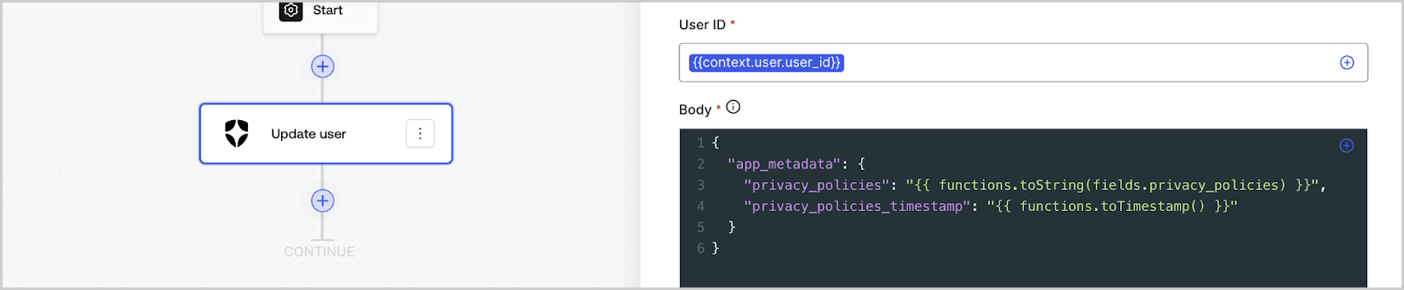
Les fonctions utilitaires vous permettent de transformer des données et d’effectuer des opérations simples. Par exemple : `{{functions.toString(fields.privacy_policies)}}` transforme la valeur du champ dont l’ID est `privacy_policies` à l’aide de la fonction `toString()`.
<Frame>
  <img src="https://mintcdn.com/docs-staging-chore-actions-triggers-autoupdate/OzH0n0WvmYgnSH8x/docs/images/cdy7uua7fh8z/1gyox33XJEtdkT43NppblT/0e878cc5ae2bde11b4207e105bbac6c5/flow-helper-functions.png?fit=max&auto=format&n=OzH0n0WvmYgnSH8x&q=85&s=43027c4e84790d5d16a06d5c105677d5" alt="Dashboard > Actions > Forms > Flows" data-og-width="1404" width="1404" data-og-height="290" height="290" data-path="docs/images/cdy7uua7fh8z/1gyox33XJEtdkT43NppblT/0e878cc5ae2bde11b4207e105bbac6c5/flow-helper-functions.png" data-optimize="true" data-opv="3" srcset="https://mintcdn.com/docs-staging-chore-actions-triggers-autoupdate/OzH0n0WvmYgnSH8x/docs/images/cdy7uua7fh8z/1gyox33XJEtdkT43NppblT/0e878cc5ae2bde11b4207e105bbac6c5/flow-helper-functions.png?w=280&fit=max&auto=format&n=OzH0n0WvmYgnSH8x&q=85&s=14601195fc7964d3e3fbe54a8c6d9670 280w, https://mintcdn.com/docs-staging-chore-actions-triggers-autoupdate/OzH0n0WvmYgnSH8x/docs/images/cdy7uua7fh8z/1gyox33XJEtdkT43NppblT/0e878cc5ae2bde11b4207e105bbac6c5/flow-helper-functions.png?w=560&fit=max&auto=format&n=OzH0n0WvmYgnSH8x&q=85&s=c4cf70bae0ab1d7f1d0a06af1d763ba2 560w, https://mintcdn.com/docs-staging-chore-actions-triggers-autoupdate/OzH0n0WvmYgnSH8x/docs/images/cdy7uua7fh8z/1gyox33XJEtdkT43NppblT/0e878cc5ae2bde11b4207e105bbac6c5/flow-helper-functions.png?w=840&fit=max&auto=format&n=OzH0n0WvmYgnSH8x&q=85&s=036d6041ad420409d9eefb2ce5dc3292 840w, https://mintcdn.com/docs-staging-chore-actions-triggers-autoupdate/OzH0n0WvmYgnSH8x/docs/images/cdy7uua7fh8z/1gyox33XJEtdkT43NppblT/0e878cc5ae2bde11b4207e105bbac6c5/flow-helper-functions.png?w=1100&fit=max&auto=format&n=OzH0n0WvmYgnSH8x&q=85&s=eafede234e1511ad31a48ee4fceac6e6 1100w, https://mintcdn.com/docs-staging-chore-actions-triggers-autoupdate/OzH0n0WvmYgnSH8x/docs/images/cdy7uua7fh8z/1gyox33XJEtdkT43NppblT/0e878cc5ae2bde11b4207e105bbac6c5/flow-helper-functions.png?w=1650&fit=max&auto=format&n=OzH0n0WvmYgnSH8x&q=85&s=25940dc40eb07a52eb61e939644177b2 1650w, https://mintcdn.com/docs-staging-chore-actions-triggers-autoupdate/OzH0n0WvmYgnSH8x/docs/images/cdy7uua7fh8z/1gyox33XJEtdkT43NppblT/0e878cc5ae2bde11b4207e105bbac6c5/flow-helper-functions.png?w=2500&fit=max&auto=format&n=OzH0n0WvmYgnSH8x&q=85&s=dfe8ba0ecf0ac023926cfc00e608ba97 2500w" />
</Frame>

Les fonctions utilitaires disponibles sont :

| Fonction                                 | Description                                                                                                                                                                                                                                                                                                           | Exemple                                                                                                          |
| ---------------------------------------- | --------------------------------------------------------------------------------------------------------------------------------------------------------------------------------------------------------------------------------------------------------------------------------------------------------------------- | ---------------------------------------------------------------------------------------------------------------- |
| `toArray(value)`                         | Convertit la valeur en tableau.                                                                                                                                                                                                                                                                                       | `{{ functions.toArray('abc') }} // ['abc']`                                                                      |
| `toBoolean(value)`                       | Convertit la valeur en valeur booléenne.                                                                                                                                                                                                                                                                              | `{{ functions.toBoolean(1) }} // vrai&lt;br /&gt;&lt;br /&gt;\{\{ functions.toBoolean(0) }} // faux`             |
| `length(value)`                          | Retourne la longueur de la valeur du paramètre.                                                                                                                                                                                                                                                                       | `{{ functions.length('auth0') }} // 5`                                                                           |
| `mask(value)`                            | Masque une valeur afin d’éviter qu’elle ne soit affichée dans Executions.                                                                                                                                                                                                                                             | `{{ functions.mask('my_awesome_secret') }} // ███`                                                               |
| `toNumber(value)`                        | Convertit la valeur en nombre.                                                                                                                                                                                                                                                                                        | `{{ functions.toNumber('123') }} // 123`                                                                         |
| `random(min, max, [boolean])`            | Renvoie un nombre aléatoire compris entre les valeurs min et max, inclusivement.                                                                                                                                                                                                                                      | `{{ functions.random(0, 6) }} // 4 &lt;br /&gt;&lt;br /&gt;\{\{ functions.random(0, 6, true) }} // 3.8523497...` |
| `slice(value, start, end)`               | Renvoie une portion d’un tableau ou d’une chaîne de caractères comprise entre les indices de début et de fin.                                                                                                                                                                                                         | `{{ functions.slice( 'example', 3, 5) }} // 'mp'`                                                                |
| `toString(value)`                        | Convertit la valeur en chaîne de caractères.                                                                                                                                                                                                                                                                          | `{{ functions.toString(123) }} // '123'`                                                                         |
| `substring(value, start, end)`           | Retourne la partie d’une valeur comprise entre l’index de début et l’index de fin. Pour en savoir plus, consultez les [différences entre les fonctions slice et substring](https://developer.mozilla.org/en-US/docs/Web/JavaScript/Reference/Global_Objects/String/substring#differences_between_substring_and_slice) | `{{ functions.substring( 'example’', 3, 5) }} // 'mp'`                                                           |
| `toTimestamp()`                          | Renvoie l’horodatage UNIX actuel.                                                                                                                                                                                                                                                                                     | `{{ functions.toTimestamp() }} // 1628761483`                                                                    |
| `toTimestamp(date)`                      | Retourne la date fournie au format UNIX.                                                                                                                                                                                                                                                                              | `{{ functions.toTimestamp('2021-04-30T10:02:50.876Z') }} // 1619776970`                                          |
| `toTimestamp(date)`                      | Retourne la date fournie au format UNIX.                                                                                                                                                                                                                                                                              | `{{ functions.toTimestamp('2021-04-30T10:02:50.876Z') }} // 1619776970`                                          |
| `toLowerCase(value)`                     | Retourne une nouvelle chaîne en minuscules.                                                                                                                                                                                                                                                                           | `{{ functions.toLowerCase('JohnDoe 1234') }} // johndoe 1234`                                                    |
| `toUpperCase(value)`                     | Retourne une nouvelle chaîne en majuscules.                                                                                                                                                                                                                                                                           | `{{ functions.toUpperCase('JohnDoe 1234') }} // JOHNDOE 1234`                                                    |
| `replaceAll(value, string, replacement)` | Renvoie une nouvelle chaîne dans laquelle toutes les occurrences d’un motif sont remplacées par une chaîne de remplacement.                                                                                                                                                                                           | `{{ functions.replaceAll('2021-04-30', '-', '/') }} // 2021/04/30`                                               |
| `replace(value, string, replacement)`    | Renvoie une nouvelle chaîne dans laquelle toutes les occurrences d’un motif sont remplacées par une chaîne de remplacement. Si le motif est une chaîne, seule la première occurrence sera remplacée.                                                                                                                  | `{{ functions.replace('2021-04-30', '-', '/') }} // 2021/04-30`                                                  |
| `split(value, separator, limit?)`        | Renvoie une liste ordonnée de sous-chaînes découpées selon le séparateur.                                                                                                                                                                                                                                             | `{{ functions.split('2021-04-30', '-') }} // ['2021', '04', '30']`                                               |
| `now()`                                  | Renvoie la date actuelle au format ISO 8601.                                                                                                                                                                                                                                                                          | `{{ functions.now() }} // 2021-04-30T10:31:28.576Z`                                                              |
| `includes(collection, item, fromIndex?)` | Indique si un tableau contient une certaine valeur parmi ses éléments.                                                                                                                                                                                                                                                | `{{ functions.includes(['auth0', 'identity', 'authentication'], 'identity') }} // true`                          |
| `indexOf(collection, item, fromIndex?)`  | Renvoie le premier indice auquel un élément donné peut être trouvé dans le tableau, ou -1 s’il n’y figure pas.                                                                                                                                                                                                        | `{{ functions.indexOf(['auth0', 'identity', 'authentication'], 'identity') }} // 1`                              |
| `merge(base, value)`                     | Renvoie un tableau ou un objet fusionné, ou concatène une chaîne selon le type de données de base.                                                                                                                                                                                                                    | `{{ functions.merge(['auth0', 'identity'], ['authentication']) }} // ['auth0', 'identity', 'authentication']`    |
| `md5(value)`                             | Renvoie une valeur hachée avec MD5.                                                                                                                                                                                                                                                                                   | `{{ functions.md5('auth0') }} // 7bbb597...`                                                                     |
| `sha1(value)`                            | Renvoie une valeur hachée avec SHA1.                                                                                                                                                                                                                                                                                  | `{{ functions.sha1('auth0') }} // b4ec5339...`                                                                   |
| `sha256(value)`                          | Renvoie une valeur hachée avec SHA256.                                                                                                                                                                                                                                                                                | `{{ functions.sha256('auth0') }} // d9082bdc...`                                                                 |
| `sha512(value)`                          | Renvoie une valeur hachée avec SHA512.                                                                                                                                                                                                                                                                                | `{{ functions.sha512('auth0') }} // c0d588069d...`                                                               |
| `uuid()`                                 | Renvoie un UUID v4 aléatoire.                                                                                                                                                                                                                                                                                         | `{{ functions.uuid() }} // 36b8f84d-df4e-4d49-b662-bcde71a8764`                                                  |

<h2 id="variables-best-practices">
  Bonnes pratiques pour les variables
</h2>

<h3 id="use-meaningful-ids">
  Utilisez des IDs parlants
</h3>

Lorsque vous ajoutez un champ de Form ou une action de Flow, l’ID est généré automatiquement.

Modifiez l’ID pour lui donner une valeur plus descriptive afin de pouvoir identifier l’information qu’il contient. Par exemple, si vous créez un champ de Form qui stocke le prénom de l’utilisateur, remplacez l’ID par `first_name`.

<h3 id="be-mindful-when-updating-existing-ids">
  Faites preuve de prudence lorsque vous mettez à jour des IDs existants
</h3>

Si une variable est déjà utilisée et que vous devez modifier l’ID, repérez les endroits où vous y avez fait référence et mettez l’ID à jour en conséquence afin d’éviter les valeurs non définies ou vides.

<h3 id="check-flow-executions">
  Vérifier les exécutions du Flow
</h3>

Si vous voyez une valeur de variable inattendue, utilisez la vue [**Executions**](/docs/fr-ca/customize/forms/flows/flow-execution-and-debugger) pour diagnostiquer le problème lié à la variable.

<h3 id="use-the-autocomplete-menu">
  Utilisez le menu de saisie semi-automatique
</h3>

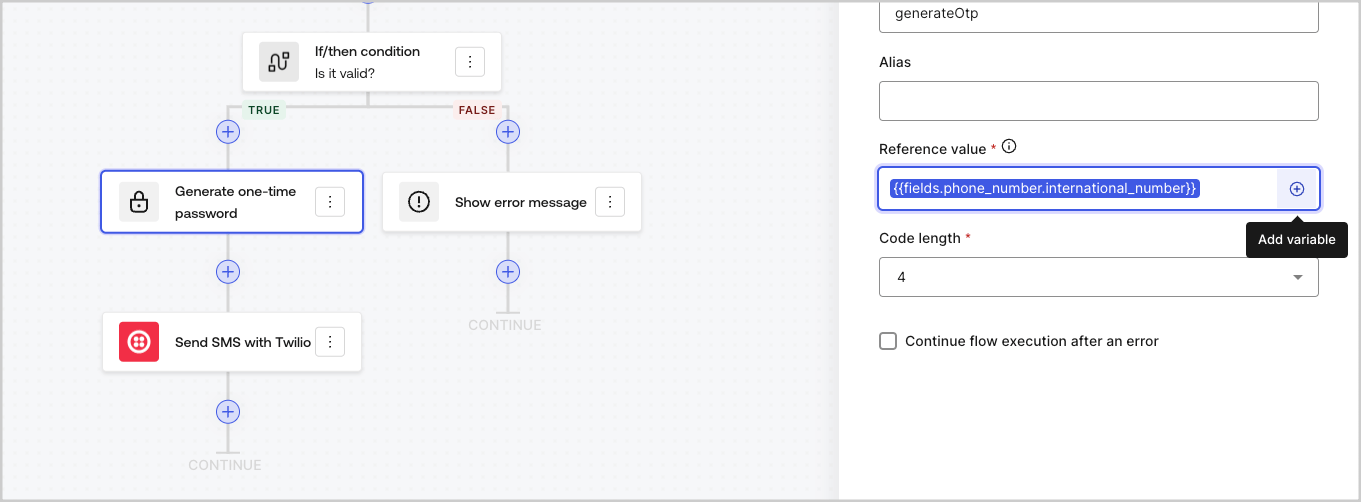
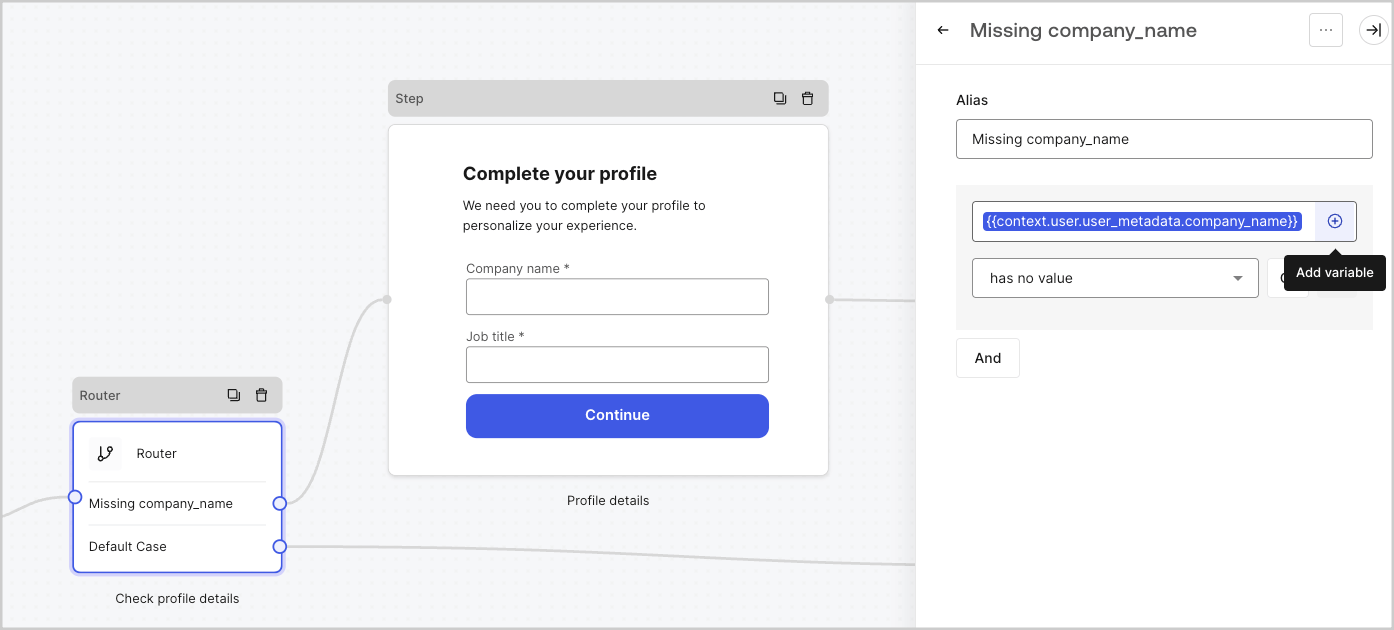
Le menu de saisie semi-automatique vous aide à trouver et à référencer correctement les variables existantes.
<Frame>
  <img src="https://mintcdn.com/docs-staging-chore-actions-triggers-autoupdate/2875Xj6H216hiJJY/docs/images/cdy7uua7fh8z/3SKnDuaMzSImxZtDDAoZaz/9ea800fad29ef71d1ded3c72b87660a4/Autocomplete-flows.png?fit=max&auto=format&n=2875Xj6H216hiJJY&q=85&s=91447b59ef227998f1022388a8fca85a" alt="Dashboard > Actions > Forms > Flows" data-og-width="1361" width="1361" data-og-height="502" height="502" data-path="docs/images/cdy7uua7fh8z/3SKnDuaMzSImxZtDDAoZaz/9ea800fad29ef71d1ded3c72b87660a4/Autocomplete-flows.png" data-optimize="true" data-opv="3" srcset="https://mintcdn.com/docs-staging-chore-actions-triggers-autoupdate/2875Xj6H216hiJJY/docs/images/cdy7uua7fh8z/3SKnDuaMzSImxZtDDAoZaz/9ea800fad29ef71d1ded3c72b87660a4/Autocomplete-flows.png?w=280&fit=max&auto=format&n=2875Xj6H216hiJJY&q=85&s=1e2d1bfaff9e409f07ab6a7896627415 280w, https://mintcdn.com/docs-staging-chore-actions-triggers-autoupdate/2875Xj6H216hiJJY/docs/images/cdy7uua7fh8z/3SKnDuaMzSImxZtDDAoZaz/9ea800fad29ef71d1ded3c72b87660a4/Autocomplete-flows.png?w=560&fit=max&auto=format&n=2875Xj6H216hiJJY&q=85&s=dda50037477a2f0c6040bcbba38464a8 560w, https://mintcdn.com/docs-staging-chore-actions-triggers-autoupdate/2875Xj6H216hiJJY/docs/images/cdy7uua7fh8z/3SKnDuaMzSImxZtDDAoZaz/9ea800fad29ef71d1ded3c72b87660a4/Autocomplete-flows.png?w=840&fit=max&auto=format&n=2875Xj6H216hiJJY&q=85&s=2d45a15f1d8298aa811e872ada69809a 840w, https://mintcdn.com/docs-staging-chore-actions-triggers-autoupdate/2875Xj6H216hiJJY/docs/images/cdy7uua7fh8z/3SKnDuaMzSImxZtDDAoZaz/9ea800fad29ef71d1ded3c72b87660a4/Autocomplete-flows.png?w=1100&fit=max&auto=format&n=2875Xj6H216hiJJY&q=85&s=943666c83b760ed28316e836ac04f9c1 1100w, https://mintcdn.com/docs-staging-chore-actions-triggers-autoupdate/2875Xj6H216hiJJY/docs/images/cdy7uua7fh8z/3SKnDuaMzSImxZtDDAoZaz/9ea800fad29ef71d1ded3c72b87660a4/Autocomplete-flows.png?w=1650&fit=max&auto=format&n=2875Xj6H216hiJJY&q=85&s=f744f8f0051f5bb3df860e4c0006ac32 1650w, https://mintcdn.com/docs-staging-chore-actions-triggers-autoupdate/2875Xj6H216hiJJY/docs/images/cdy7uua7fh8z/3SKnDuaMzSImxZtDDAoZaz/9ea800fad29ef71d1ded3c72b87660a4/Autocomplete-flows.png?w=2500&fit=max&auto=format&n=2875Xj6H216hiJJY&q=85&s=f6fb56e6c5e2735a5968488fa427a8f7 2500w" />
</Frame>

<Frame>
  <img src="https://mintcdn.com/docs-staging-chore-actions-triggers-autoupdate/2875Xj6H216hiJJY/docs/images/cdy7uua7fh8z/2kjRKozVgrd2a7UJXOANaN/ee5452d7210cd2f13b0e97763f11c82a/Autocomplete-forms.png?fit=max&auto=format&n=2875Xj6H216hiJJY&q=85&s=a84331a5cbb42b1911611ce579d5942b" alt="Dashboard > Actions > Forms > Form" data-og-width="1394" width="1394" data-og-height="630" height="630" data-path="docs/images/cdy7uua7fh8z/2kjRKozVgrd2a7UJXOANaN/ee5452d7210cd2f13b0e97763f11c82a/Autocomplete-forms.png" data-optimize="true" data-opv="3" srcset="https://mintcdn.com/docs-staging-chore-actions-triggers-autoupdate/2875Xj6H216hiJJY/docs/images/cdy7uua7fh8z/2kjRKozVgrd2a7UJXOANaN/ee5452d7210cd2f13b0e97763f11c82a/Autocomplete-forms.png?w=280&fit=max&auto=format&n=2875Xj6H216hiJJY&q=85&s=6cef2f5c768e8dd2dd6e980ed7e41b5d 280w, https://mintcdn.com/docs-staging-chore-actions-triggers-autoupdate/2875Xj6H216hiJJY/docs/images/cdy7uua7fh8z/2kjRKozVgrd2a7UJXOANaN/ee5452d7210cd2f13b0e97763f11c82a/Autocomplete-forms.png?w=560&fit=max&auto=format&n=2875Xj6H216hiJJY&q=85&s=82a98ca98196b318319de2f840a3d40e 560w, https://mintcdn.com/docs-staging-chore-actions-triggers-autoupdate/2875Xj6H216hiJJY/docs/images/cdy7uua7fh8z/2kjRKozVgrd2a7UJXOANaN/ee5452d7210cd2f13b0e97763f11c82a/Autocomplete-forms.png?w=840&fit=max&auto=format&n=2875Xj6H216hiJJY&q=85&s=94f77c9f128e3520e2225b1d99b29bee 840w, https://mintcdn.com/docs-staging-chore-actions-triggers-autoupdate/2875Xj6H216hiJJY/docs/images/cdy7uua7fh8z/2kjRKozVgrd2a7UJXOANaN/ee5452d7210cd2f13b0e97763f11c82a/Autocomplete-forms.png?w=1100&fit=max&auto=format&n=2875Xj6H216hiJJY&q=85&s=649ff4e3f7fe765cb3d153d1a17fbd0f 1100w, https://mintcdn.com/docs-staging-chore-actions-triggers-autoupdate/2875Xj6H216hiJJY/docs/images/cdy7uua7fh8z/2kjRKozVgrd2a7UJXOANaN/ee5452d7210cd2f13b0e97763f11c82a/Autocomplete-forms.png?w=1650&fit=max&auto=format&n=2875Xj6H216hiJJY&q=85&s=eac95dd8640ea2146c994321dff0ed72 1650w, https://mintcdn.com/docs-staging-chore-actions-triggers-autoupdate/2875Xj6H216hiJJY/docs/images/cdy7uua7fh8z/2kjRKozVgrd2a7UJXOANaN/ee5452d7210cd2f13b0e97763f11c82a/Autocomplete-forms.png?w=2500&fit=max&auto=format&n=2875Xj6H216hiJJY&q=85&s=a5b3d486168b35835fc13e06c46bf317 2500w" />
</Frame>
